Return to satcure apple macintosh contents page Return to SatCure Mac index page


SatCure Apple Macintosh Computer Reviews

Web Site Turbo by VSE

Web page creation programs such as Claris Home Page always save your web pages with a pretty HTML text layout, to make it easier to edit, by padding out the code with spaces and returns. Web browsers ignore these so Web Site Turbo can safely remove them without affecting the page's appearance in a browser.

However, VSE Web Site Turbo does not only remove spaces and returns.

VSE Web Site Turbo knows about 100 optimization possibilities to make your HTML documents smaller and faster. The optimizations fall in different categories:

  • Removing unecessary characters. All those spaces, tabs and returns make your HTML document more readable for authoring but it just increases the time the web browser needs to download and parse through your document.
  • Removing optional tags. The HTML specification defines some optional tags. VSE Web Site Turbo only removes those optional tags when the web browsers follow the specification. The optional tags are: </COLGROUP>, </DD>, </DT>, </LI> and </OPTION>.
  • Removing redundant tags introduced by authoring tools.
    Example: Claris Home Page likes to add the <X-SAS-WINDOW> tag to your documents, which is used only by the application itself. Web browsers do not use it.
  • Removing redundant tag attributes. Example: The <IMG> tag attribute "HSPACE=0" is simply not needed.
  • Unquoting tag attributes. Example: The HTML specification says that <TABLE WIDTH="100"> can be shortened to <TABLE WIDTH=100>.
  • Shortening tags. Example: The tag <STRIKE> can be expressed as <S>, which is smaller.
  • Shortening tag attributes. Example: The tag <OPTION selected="selected"> can be shortened to <OPTION selected>.
  • Removing comments from HTML and JavaScript texts.
  • Qualifying URL's.
SatCure Apple Macintosh computer software and hardware reviews VSE web site turbo review
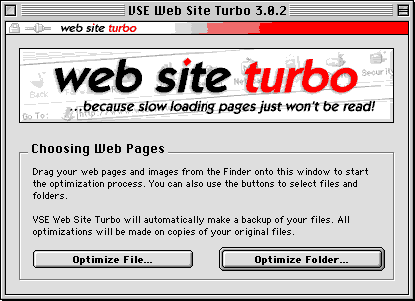
Using WST is simple! See the instructions above. You can click on the button and select a file or a complete folder to optomise. Alternatively, in typical Macintosh style, simply drag the file(s) onto this window and the process begins.

Each time you do this, a report is produced which you can read in your favourite browser (select it in the preferences before you begin). The report shows the "before" and "after" file size and an approximate idea of how much upload time you will save.

The optimised files are saved in a new folder called "Web Site Turbo Optimized Files" with the icon of the browser of your choice. In fact this doesn't matter because you must not open the optimised files! Well, you can open them but you must not resave them from your page creation software or you'll lose the optimisation and have to do it again. If you do open an optimised file it will look unchanged because your creation software instantly puts back all the "padding". You can, however, look at the optimised file in a text editor such as SimpleText (provided the file size is less than 32k).

Once your files are optimised, upload the copies to your server then trash them.
Any future changes are made to your original files which are still safely where you left them. So the routine is:

  • Change a file
  • Optimise it
  • Upload the copy
  • Trash the copy

Advantages:-

  • You make a much better first impression because your web pages load much faster
  • Your home page flies in before your visitors can even think about leaving
  • You make more money because of better impression and because your visitors finally read what you have to say
  • Your server can support more connections simultaneously because page retrievals take less time to complete
  • Your server's performance is increased
  • You save bandwidth costs, every day and every hour
  • You save server space
  • You save time while uploading your web site

VSE Web Site Turbo is available from:

Voget Selbach Enterprises GmbH

Click here for great Macintosh software!

Mail Koenigsberger Str. 28, 56235 Ransbach-Baumb.,Germany

Fax 800 886-7084 (toll-free,USA) or (561) 423-0457 (USA)

Retsatcure apple macintosh contents page Return to SatCure Mac index page


This Web Site was produced entirely on a Macintosh Computer.


SatCure macintosh computer, mac modem cables, printer cable. Apple mac computer accessories: SCSI leads, terminator, battery, batteries and lithium cells.