 Return to SatCure Mac index page
SatCure Apple Macintosh Computer Reviews
| |
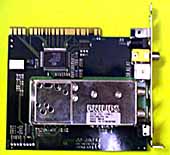 | Note: Latest news about this product at the BOTTOM of this page. This plug-in card was bought from MacWarehouse who promised 5 days delivery but actually delivered next day! That's the good news. |
 | There were no instructions but the brief information on the outside of the box said "MacOS 7.6 or higher". That was OK. My beige Apple Mac G3/266 was running OS 8.5.1. I looked on the accompanying CD for some sort of software or readme file and found several folders, one of which was labelled"ProTV series". Great. Inside was an installer and a manual in PDF format, which I decided to read first. The manual makes no use of the "bookmark" (index) system so finding the right page isn't easy, since the page numbers don't correspond to those in the Contents list. |
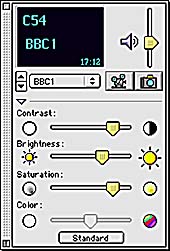
 | The first thing I noticed was "MacOS 8.6 or higher". That's not what it says on the box and it gave me a problem immediately since My G3 had an earlier version of the Mac Operating System. However, I decided to do it properly and spent the next three hours downloading the free updater from Apple's web site. Having updated my system and got everything working again, I plugged the ProTV card into a spare PCI slot alongside my Belkin USB card and powered up the G3. The software installation took only a few seconds before I was ready to reboot one more time. This was exciting! As soon as the G3 had rebooted, I double-clicked on the ProTV 2.5.3 icon to launch it. An error message appeared: "The ProTV currently used by another application. You cannot use the display". Darn! I was missing "Star Trek Voyager". There was no obvious reason for this. I made sure that Virtual Memory was off and disabled all extensions that weren't needed. This made no difference so I removed my Belkin USB PCI card and its driver and extension. Still the same error message. I wondered if it would work in my PowerMac 9600/200 so out of the G3 it came (observing static electricity handling precautions) and into the 9600 which is running OS 9.0. With the software installed, it worked right away! I went to plug the TV aerial in but the plug wouldn't fit. It appeared to be an RCA socket so I borrowed a "Phono" plug, soldered it in place of the TV plug and in it went. I had a picture, yay! But it was very poor, with bad interference lines. I traced this problem to the proximity of the video card in the adjacent PCI slot. I moved the ProTV card to another slot, leaving a 3 inch gap between it and the video card. The picture was much better but there was still interference on weak signal channels. This could largely be eliminated by placing a hand between the two PCI cards so a metal shield wouldn't go amiss. I played with the settings, tuned in all available channels (every one had to be "fine tuned" because the automatic tuning locked onto the signal with a slight error so the pictures lacked colour). However, when I increased the picture size from "normal" to "largest", the previous picture frame remained on top of the new picture as a very evident "ghost" image which nothing could shift. I tried simply dragging the lower right corner of the picture to increase the size and this worked fine up to a specific size, beyond which that ghost image would remain. Another strange effect was that of streaks, flashes or "sparklies" appearing on the image wherever there was rapid movement occurring - rather like a satellite TV picture where the signal level is just on the tuner threshold or a video recorder with "worn heads" or poor "tracking". Another minor annoyance is that every UK channel is tuned in on the UHF channel number below the one normally associated with that frequency. As an experiment, I selected Virtual Memory "on" and rebooted the 9600. Now ProTV 2.5.3 gave the same error message as the G3 had. "The ProTV currently used by another application. You cannot use the display". I Turned off Virtual Memory and rebooted. Now it refused to launch, reporting error number 11 (Hardware exception error - whatever that means!) I rebooted and the same thing happened so I wiggled the ProTV card very gently in its socket and rebooted. This time it worked OK again. Back to the G3. If it won't work with OS 8.6, how about OS 9.0 as on the 9600 ? I spent the next hour installing OS 9.0 and then setting it up. I reinstalled ProTV 2.5.3 and got the same error message as previously, even though Virtual Memory was "off". Only one more thing to do: a "clean" installation of OS 9.0 which took another 30 minutes to complete. I'm just glad I wasn't using Windows! Reinstalled, ProTV 2.5.3 gave the same error message. Yes, I did try trashing the ProTV preferences file, with no effect. A few other points: ProTV 2.5.3 contains links to the Formac web site which are not "clickable" and don't work anyway! One of them is: http://www.formac.com/english/support/updates.html The main web site still exists but this file does not. Anyone who has read the "Be Found" booklet at http://www.satcure.com will understand that there is NO excuse for deleting a web site file. It should always be left in place with a forwarding link to the new page. In this case it appears to be http://www.formac.com/2k/support/software_support.html I also tried http://www.formac.co.uk but there's no technical support page or information about upgrades or problem solving so you are left with the option of sending an e-mail or phoning. I tried e-mailing which, 2 days later, elicited the response that I should remove the "Real Audio" codec files from the System Extensions folder. I did this but with no effect. However, I had posted a message in a News Group (like a bulletin board) and received an e-mail reply from a helpful guy in Germany who informed me that Formac had admitted there was a problem with the G3 Apple Mac and had provided a software update on their USA web site. After a search, I found this but it's a "beta" test version. I downloaded it and installed it but now not only did I get the error message mentioned previously but in addition it informed me that the software was out of date! Next day, I phoned Formac UK technical help line and, amazingly, the darn ProTV software began to work when I did so. It must have needed a good night's rest! The conclusion, then, is that it will work in the G3 Apple Mac (and apparently in the G4 and the iMac, too). However, the software still is rather "buggy" and I didn't pay £96 for the privelege of being a beta tester. Having accepted that it is beta software, with the occasional system crashes, the disappearing tuner setup menu, the poor quality mono audio with crackling and noticeable "lip sync" delay through the computer's own sound board (sounds better direct from the Pro TV board, although not enough deemphasis) it's time to look at what the ProTV board can do. It provides an on-screen picture which you can watch while working in other applications. Although the picture will freeze, briefly, with processor-intensive operations, the audio is unaffected. The picture can be any size in any screen position and the quality is excellent although the colour control for some reason remains "greyed out" and unavailable. The picture can come from the ProTV tuner module (fed from a TV aerial, satellite or cable TV signal), from a composite video input or an SVHS input. Instead, it can come from an internal source such as CD (and probably DVD but my G3 hasn't that capability). The sound can come from the ProTV tuner module or from any external source of suitable impedance. ProTV supports PAL, NTSC and SECAM, so no problem there. However, it doesn't appear to support Nicam stereo or, despite its name, any stereo. |
 | |
 | |
 | |
 | |
 | |
 | |
 | |
 | |
 | |
 | |
 | |
 | |
 | |
|
|

|
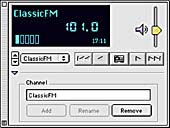
| There is also an FM aerial input and you can select a software Radio Tuner instead of the TV tuner. This works well but, disappointingly, the output is mono not stereo. The PDF manual doesn't mention stereo other than in the title. The ProTV software allows you to save screenshots to your hard drive. You simply click on an icon to record a movie of what's happening on screen or simply to take a snapshot. Unfortunately, each time you do this, it overwrites the previous file, unless you alter the preference which I found under "tuner setting" rather than under the "file" menu. The snapshot and recording facilities work well, although the actual frame rate on the display slows right down to around 3 fps, making it tedious to watch and record simultaneously. This is related to the speed of the Mac processor, however, and not the ProTV card or software. In fact, considering that my G3 has only (only?) a 266MHz processor, the performance was exceptionally good. The record facility can be set to take time-stepped frames from a video input which could be, for example, a security camera. Unfortunately, I wasn't able to test this since, each time I clicked on the "time" menu tab (which, curiously, comes under "tuner settings") the program crashed and, with the still-poor memory management of any Apple Mac using Operating System 9 or earlier, crashed the Mac as well. It's not easy to test something bought with apparently finalised software, only to discover that you have to use "beta" software to get it to work at all. If all the bugs are resolved then the ProTV PCI card is to be recommended to any Apple Mac user. Since Macs tend to be used a lot in publishing and video making, there should be a good market for the product. However, with the price of Macs decreasing while the processor speed increases, I can see a use for the time-lapse facility, too. Perhaps for security applications where high quality pictures could be stored on disc or for the "web-cam" systems whose popularity is increasing. However, I would recommend not buying until the ProTv Stereo system works properly. The audio problems worry me because I'm not convinced that a mere software change can give the deemphasis required or the stereo sound which seemingly ought to be there - but isn't on mine. |
Later InformationThe ProTV card which I bought from Macwarehouse with ProTV 2.5 software on CD did not work at all in my beige G3/266. It gave an error message indicating that another application was already using the card. I e-mailed Formac UK and, after several days, received the reply that trashing the Real Audio codec in my system extensions folder would fix the problem. It didn't and I'd already done that by installing a "clean" OS9.0. However, I received help from a German guy via an Internet News Group who pointed out that a beta version of the software was available from the Formac web sites. I downloaded this and the ProTV software now worked, albeit not very well. I reported the problems to Formac UK who presumably passed them on without bothering to reply to me. I discovered a new beta version at the web site yesterday. ProTV 2.6.0fc3 This solves several problems including incorrect TV UHF channel numbering and crashing when clicking on the "Time" flag in the "Tuner setup" menu. A final release version of the software is due shortly. Some problems still remain and the User Manual in PDF format is not very helpful. However, the following may help others: Note that these points are *in addition* to the suggestions listed in Formac's own web site FAQs.
1. Why do I get only mono audio? a. Stereo audio is available from the radio but only via the ProTV audio output jack socket. You can not get stereo via the Mac's own audio socket. b. Stereo audio is NOT available for TV because the ProTV card does not include a Nicam stereo decoder circuit (which would make it twice as expensive).
2. Why is there sibillance on audio - as if everyone is wearing false teeth? a. In the Audio Setup menu, reduce the gain setting to minimum.
3. Why is the "Color" adjustment greyed out? a. This is actually the "hue" control for NTSC broadcasts and is not needed for PAL broadcasts.
4. Why do I get picture problems - such as a ghost image of the small picture remaining on the larger picture when I increase the size? a. Most picture problems are caused by an incompatibility with the computer's own graphics card. The Formac software can not be written for compatibility with *all* available graphics cards. Formac can supply their own compatible card.
5. How can I change the colour? a. Select "Video setup" from the "Setup" menu. From the "drop-down" selection bar, select "Image" instead of "ProTV Panel". You can now adjust the colour setting as well as brightness and contrast.
6. How do I mute the Mac's own internal speaker? a. On the TV tuner control window, click on the loudspeaker icon. This will now have an "X" on it. To revert to internal speaker, click on it again and the "X" will disappear.
7. Why are the lip movements out of sync with the sound? a. The internal Mac audio circuit takes a finite time to process the data stream from the ProTV board. To avoid this problem, use the audio connection provided on the back of the ProTV card itself.
8. What the heck are the sockets on the rear of the ProTV card? What do I need to connect my TV aerial? a. The TV/cable and radio aerial sockets are both "RCA Phono" type. You need an RCA Phono plug-to-IEC TV socket adaptor.
9. What is the audio output socket on the rear of the ProTV card? a. This is a stereo 3.5mm jack socket. The plug has three sections (mono plugs have only two). Warning! You must not connect ordinary loudspeakers to the ProTV card or to your Mac. Use only "Amplified" speakers. (You can tell they are amplified because they will have a separate power supply). | |
| NEW SOFTWARE At the time of writing February 10, 2001 the latest full version of the software is ProTV 2.6.3f1 This resolves several of the problems mentioned above. September 20, 2002 Still using this software with OS9.1 and it has worked fine for months :o) | |
Return to SatCure Mac index page
This Web Site was produced entirely on a Macintosh Computer.
ProTV SatCure macintosh computer, mac modem cables, printer cable. Apple mac computer accessories: SCSI leads, terminator, battery, batteries and lithium cells.