 Return to SatCure Mac index page
SatCure Apple Macintosh Computer Reviews
| ||
|
VSE is actually a small German company but you can't tell from their software. Their English is better than mine and, with BeFound you really get a Mercedes for the price of a Mini. BeFound is one of the most useful pieces of software for anyone who creates web sites. I stress sites plural because you might not want to pay for it just for your own personal web page. In essence it is a URL submission package but it contains far more than that and it is so easy to use - partly because it has been written specifically for the Mac. Launch BeFound and it presents you with a window onto which you can drag the web page files that you want the search engines to register. This is all done off-line, by the way. You can begin with your index page which will be "index.htm" or "index.html". Drag it onto the BeFound "Welcome" window then click on "Information" and it will display your web page title, key words and description (if any). If you have not already entered these in the head of your page script, you can do so now in the friendly windows provided. Here is a screen shot of my own index page information. Apologies for the blurred picture but I thought you'd prefer to see it in 5 seconds, not 50 seconds so I compressed it till it screamed (using Flash4 by Macromedia). 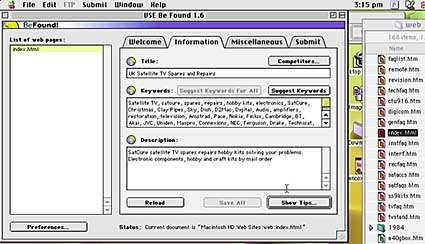 Firstly, if you have no keywords, click on "Suggest Keywords". BeFound will look through your page then list words that appear often. Note how it separates each word or phrase with a comma and a space. This is how most search engines prefer it. You learned something already! Now delete those words and phrases that nobody will ever type into a search engine. You can also add any key words or phrases (up to 3 words) that you think someobody might search for to find a web site like yours. Don't forget to include common misspellings. For example, I include "reciever" and "satalite" because thousands of people have no idea of the correct spelling (satellite receiver). Once you are happy with your key words, add a suitable title and a description of your web site. It doesn't have to be grammatically correct - it's more important to include a few key words in the title and description. This encourages the search engines to give it a higher ranking. Now click on the "Save" button and BeFound will put your changes into the page head code like this: <HTML> This information remains invisible to the reader of your web page but the search "robots" can find it - indeed, it is essential that they do! You needn't worry about the HTML code if you don't understand it. Just be content that BeFound has done its job. If you do understand the Meta Tags code then you might like to adjust it later. Now click on "Miscellaneous" and BeFound will present you with another window that you can use to enter information into your web page head. 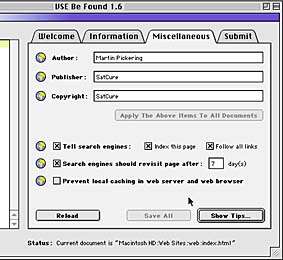 Entering your details as I have done will produce the following meta tags in your page head when you click on "Save" again: <meta name="author" content="Martin Pickering"> This is simply informing the search engine robots of who created the web site and how often they should reinspect it to note changes. If you upload changes almost every day (as I do) then 7 days is realistic. Otherwise make the period longer. Clicking on the little globe buttons will bring up an information window about the particular entry to tell you why you should, or should not, use it. Note that, if you do not select "Index this page", then a meta tag will be added to tell the search engines to ignore the page. This is useful for pages which, for example, contain an order form but nothing else. (You wouldn't want someone coming from a search engine and landing directly on that page). Note: DO NOT put "Under Construction" in your web pages if you intend to submit them to search engines. Most search engines will immediately abort your registration if they find these words. Now click on "Show Tips" and BeFound will search your page to produce a report. This screen shot shows just a glimpse of the final paragraphs in the report for my index page: 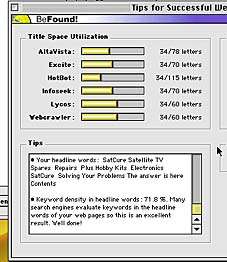 BeFound checks not only the invisible meta tags in the head of the page, but also the words in the headings - the phrases that you format as "header" - for example: <H1><CENTER><FONT COLOR="#FF0000">SatCure Satellite TV</FONT> Spares The tag <H1> denotes the largest size heading. Again, if you use a web page creator and don't understand HTML code, it doesn't matter. Just realise the fact that the words and phrases you use in your headings are important and BeFound will tell you how good your choice of words is. Note: If BeFound does not include a "headline words" report, this is because you don't have any! Be sure to add some. Sometimes BeFound will report that certain key words do not appear in the visible text of your page. This is quite often the case when your index page simply says something like "Welcome to my home page" and shows a picture with "Click here to enter my site". In a case such as this one, you should type the missing key words into the visible text area of your page. If you can't use the key words in meaningful sentences, you can simply make them "disappear" by giving them the same colour as the page background. When the "Tips" report is satisfactory for ALL your pages, you can save them for the last time and upload them to your web site. You can do this by using "Fetch" (a specialised FTP program) or by using the facility in your web page creation software (such as Claris Home Page). If you do not have these, you can click on "Upload" and use the facility that BeFound provides. Once the pages are uploaded to the server, you can click on "Submit". Click on "Submit Automatically" and you will see a list of search engines available. You can buy upgrades containing even more search engines by visiting the VSE web site. The most useful additions are the "UK Basic Kit" and the "Europe Basic Kit" if you live in the UK. 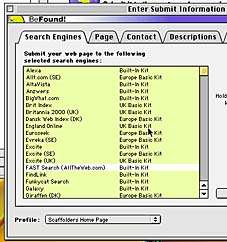 You can select (yellow) ALL the search engines by clicking the pull-down menu button at the top right of the window (not seen in this screen shot - I wanted to keep it small). You can deselect (white) individual search engines in the list by holding "command" (apple or cloverleaf button) and clicking once on the appropriate line. Once this is done, click on the "Page" tab. Type in details of your URL. There is no need to include "index.htm" so just put the basic web site URL like http://www.your-book.co.uk Be sure to check the box "This is the topmost page" if that is true. If you are submitting, say Now click on "Contact" and enter the required details. Note that some search engines use this information to send you one or more mailshots so choose your e-mail address carefully if you have more than one. I have several that I can disable or ignore if too much "spam" mail arrives. If a search engine replies after submission to tell you that "you must register at our web site, decide carefully what you are being asked to do. Some try to extract money; others try to sign you up for mail shots. If in doubt, do nothing! Now click on the "Descriptions" tag and complete that page. What is required is three descriptions of what your web site is about. Include key words and use the requested number of characters or words. This is self-explanatory as you will find when you do it. It is merely an expansion of your original page description. Now click on the "Validation" tag to make sure the selected search engines will accept your submission. If they won't, either make alterations or let BeFound deselect them for you. If you now click on "Submit", BeFound will attempt to connect to your ISP so be sure that your computer and modem are ready to do that. A progress screen will appear to show how the submission is proceeding. It is usually very rapid and takes only a minute or two to make submissions to 50 search engines. 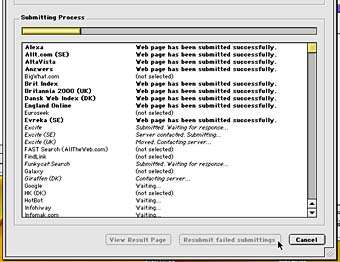 The version reviewed is 1.6 and will be updated in summer 2000 to version 2.0. The new version will include additional features - for example it will provide a text file with a list of the search engines to which your web site was submitted successfully. Version 1.6 produces a folder of individual reports in HTML format, which is very clever but not very helpful if you need to give a list to your customer. Upgrade from 1.6 to 2.0 will be free. Martin Pickering ________________________ VSE BeFound is available from: Voget Selbach Enterprises GmbH ___________________________________________________________ Mail Koenigsberger Str. 28, 56235 Ransbach-Baumb.,Germany Fax 800 886-7084 (toll-free,USA) or (561) 423-0457 (USA) | ||
| Limitations Of The Unregistered Version Having received your personal unlock code, you will be able to use VSE Be Found without limitations. VSE Be Found Professional | ||
| ||

Return to SatCure Mac index page
This Web Site was produced entirely on a Macintosh Computer.

SatCure macintosh computer, mac modem cables, printer cable. Apple mac computer accessories: SCSI leads, terminator, battery, batteries and lithium cells.